What a combined meal planner and grocery-list app should help a household do
A meal planning app with a grocery list is not two features sitting next to each other. The useful version turns a decision you have already made - what the household will eat this week - into the shopping work that follows: the ingredients each meal needs, the amounts, what you already own, and what actually has to come home from the store. When the two halves connect, you stop retyping the same information into a notes app and start every shop from the plan.
That is why choosing a weekly meal plan grocery list app for busy families starts with the handoff, not the feature count. The question is whether the app shortens the path from "here is our week" to "here is the list" without adding decisions you have to repeat every time.
Start with the family's real weekly planning workflow
Before you compare apps, write down how the week currently works. Who decides what the household eats? When does the main shop happen, and how often do top-up trips break it? Which nights need a 20-minute meal because of practice, commuting, or a late shift? Who cooks, and who needs to see the plan without editing it?
Treat that document as your measuring stick. A demo video shows a tidy week with one dinner per night; your week probably includes packed lunches, snacks, a planned leftover night, and at least one evening where the plan falls apart. Write those cases down, then score every app against them.
Inputs to gather: your last two weeks of actual meals, the recipes you cook most often, the staples you buy on every trip, and the people who need access. That is the material your test will run on.
Evaluate meal scheduling and repeat-meal support
A scheduler earns its place if it can hold your whole week. Look for a weekly view that covers every day and every eating occasion you care about - breakfast, lunch, dinner, snacks - rather than a single dinner slot.
Repeat meals are where busy households feel the difference. If Tuesday's chili is planned again on Thursday, you should not have to rebuild the entry or its ingredients. Notice whether the app supports planned leftovers, copy-a-day or copy-a-week actions, and moving a meal to another day without breaking the connected list. A small change that quietly detaches the list from the plan is worse than no connection at all.
Completion check for this step: your actual next week entered in about fifteen minutes, including repeats, without the app fighting you.
Check how recipes or meal entries become grocery-list items
This bridge is the whole point, and the plan becomes a list in one of a few ways: full recipes with structured ingredients, manual meal entries with free-text notes, or a hybrid where recipes can be overridden. Test the bridge with a real dish that serves four and see whether the list arrives with quantities and units attached, not just ingredient names.

Extension guidance on meal planning puts the same idea in plain terms: write down the ingredients for the meals you plan, then cross off what you already have on hand (Purdue Extension). A good app automates the first half and prompts the second.
Also check the reverse direction. When you delete a meal from the week, does its ingredient disappear from the list, or do you have to hunt for it? When you add an item directly to the list, does it stay out of the meal plan? The cleanest apps keep a visible link between list items and the meals that put them there.
Some households keep the plan elsewhere and cover only the second half with a list-focused app. Proxium, for example, describes its shopping lists as categorized lists with quantities, prices and a running basket total, shared with family in real time, with core features free and unlimited categories, prices and totals plus voice add in its one-time Pro upgrade. A list-first option like that can be the grocery half of a plan you keep in a calendar or on paper, but the bridge between plan and list stays manual - a trade-off worth weighing against your workflow.
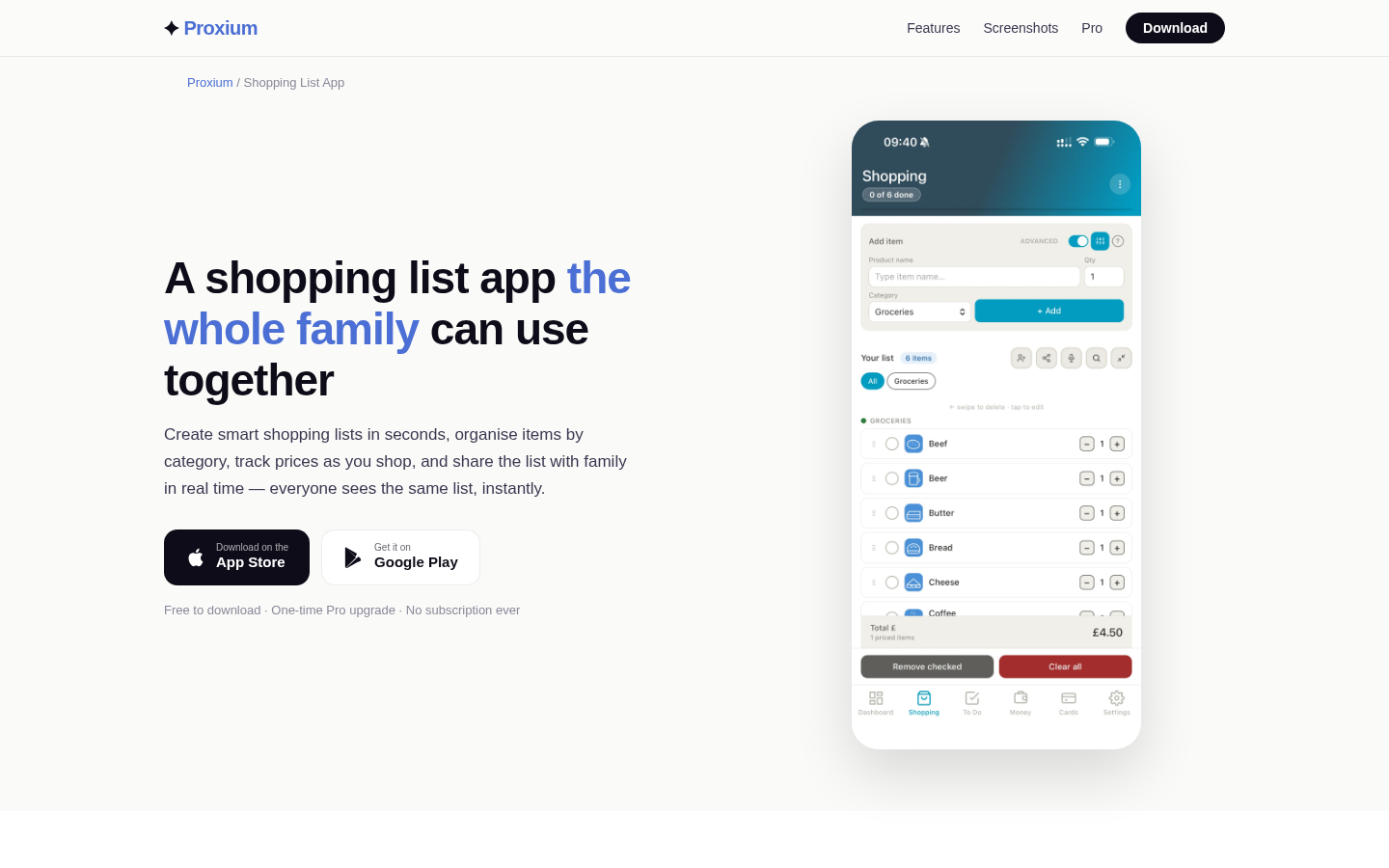
Feature landing page for shopping list app with family sharing, quantities, categories, and prices.
Look for serving adjustments, ingredient consolidation and duplicate handling
Serving-size changes are the first stress test. Ask the app to take a four-person recipe down to two, or up to six, and check that quantities move with the servings. Watch for awkward units: half an onion, a third of a can, or a spice measurement that turns into something you cannot buy or measure. An app that scales cleanly saves arithmetic; one that scales blindly creates shopping lists you have to double-check.
Consolidation matters more than it sounds. If three dinners all use onions, you want one line that reflects the total, not three lines that send you back down the same aisle. Think of it as three recipes becoming one consolidated list, with shared ingredients merged rather than repeated.
Duplicate handling is the same problem in unit form. One recipe calls for a cup of rice, another for 200 grams. Does the app sum them, flag the mismatch, or quietly list both? Decide what you want before you compare: most households prefer an automatic merge with a visible flag when units or forms do not match.
Decide how pantry items and staples should be reviewed
Every list needs a moment of subtraction. A pantry check lets you mark what you already own - the open bag of rice, the second jar of pasta sauce, the freezer bag of peas - and remove it before shopping. Some apps maintain a pantry model; others rely on you to uncheck items. Either can work as long as the step is fast. Forget it, and the app faithfully delivers duplicates.
Staples deserve their own routine. Milk, eggs, bread, oil, flour, and coffee come home most weeks regardless of the meal plan. A recurring-staples list with a quick review step keeps them from being forgotten without turning every shop into a full inventory.
The goal is a two-minute pass before you leave: review staples, subtract the pantry, confirm the list. That is your completion standard for this criterion.
Assess family sharing, permissions and ease of participation
Sharing turns a personal list into a household tool, so examine exactly who can do what. Can a partner or teenager add an item without editing the meal plan? Can anyone check items off, or only the shopper? Can a member remove something you added deliberately? Permissions that are too open create accidental changes; permissions that are too tight mean items arrive by text message instead. A family meal planner app that only one person can edit is a personal tool with a shared label.
Participation has a speed test: can a family member add "we're out of milk" in under a minute, on a device they already use, without creating another account? If the answer is no, the sharing feature exists on paper only.
Also check what a shared plan session looks like in practice: whether changes appear while someone is already at the store, and whether notifications are useful rather than noisy. The best test is one real week with at least one other person added.
Check substitutions, dietary labels and custom recipe entry without assuming medical suitability
Substitutions keep a plan alive. If a recipe calls for an ingredient you do not have, the app should offer a way to swap it and keep the rest of the meal intact. Look for whether the swap carries through to the list instead of leaving the original item behind.
Dietary settings - vegetarian, gluten-free, dairy-free, and similar - are best treated as organizational labels that help you filter recipes and match them to how your household eats. They are not a medical assessment, and an app cannot judge whether a specific food is safe for a specific person. If your household manages allergies, celiac disease, or a clinician-directed diet, use professional guidance and read product labels rather than relying on an app's tags.
Custom recipe entry decides whether the app survives contact with your family's cooking. How long does it take to add the dish everyone asks for? Can you paste ingredients, adjust the serving count, and keep notes? If entering your own recipes is painful, the meal plan stays thin and the grocery list quietly loses value.
Compare setup time, weekly maintenance and export options
Setup time is the one-off cost: migrating favorite recipes, building categories, inviting people, and learning where things live. Weekly maintenance is the recurring cost that matters more: how long it takes to turn the plan into a list, and how often the list needs manual repair. Track both during your test instead of trusting first impressions.
Export options are your exit strategy. Can you print or share the grocery list? Can you send the week's plan to someone who does not use the app? Can you get your recipes and lists out if you decide to switch? A free meal planning app with grocery list features may cover the basics, while a weekly meal planner with grocery list on a budget often looks different once you check which capabilities sit behind a paid tier - and whether the free tier is genuinely usable for a household your size.
Run a one-week test before moving the household's full meal plan
Do not migrate the whole household on the strength of a trial. Run one real week first, in parallel with whatever you use now. Enter next week's actual meals, generate the list, shop from it, cook from it, and deal with at least one disruption - a swapped night, an extra guest, a missing ingredient.
Your completion standard is concrete: a week of meals you actually cooked, a checked-off grocery list, and brief notes on what broke. The notes matter more than the outcome. If the plan and list stayed in sync through a real week, you have your answer. If you spent the week fixing entries, you have a different answer.
Keep the test honest by limiting it to one week and one household season. A plan that works in a quiet week may strain during a holiday, a school break, or a busy work period, so retest the specific pain points before committing. App capabilities and pricing also change over time, so recheck anything you are about to rely on.
Questions to ask before choosing an app
A roundup that names the best meal planning app with grocery list is a shortlist, not a verdict - the same capability can be right for one household and wrong for the next. Use these questions to compare candidates against your own workflow:
- Can the planner show my whole week, including snacks and planned leftovers?
- Does changing servings change the grocery list, units included?
- Does the list merge ingredients shared across meals?
- Can I subtract what is already in the pantry before shopping?
- Who else can view, add, or check off items, and what do they need to sign up for?
- Can I export both the list and the plan, and take my recipes with me?
- How long does one week's plan-to-list routine take after setup?
- Can I add and scale our own family recipes?
- What happens when two meals need the same ingredient in different units?
- Which capabilities are free, one-time, or recurring - and will I still need them in six months?
If the answers match the workflow you wrote down at the start, you have a shortlist worth testing. If they match a marketing page instead, keep looking.